The Road To istio
See BitBucket: sa-k8s
This is a note about converting my current nginx ingress based routing to istio using gateways and virtual servers.
Current Status
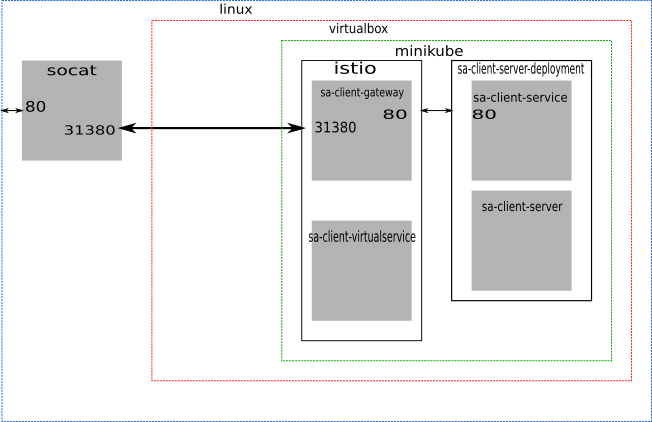
I finally got the routing working on minikube with port proxying on the server box and port forwarding on virtual box. The current scheme maps linux port 80 to 31380 which is the istio istio-ingressgateway non https port.
Currently running Kuberenets 1.13.1 with istio 1.0.5
Currently I have four gateways running as :
pm@razor:~/dev/projects/spec-sa$ kubectl get  gateways --all-namespaces
NAMESPACE      NAME                              AGE
agate          auth-gateway                      1d
istio-system   istio-autogenerated-k8s-ingress   1d
sacl           sa-client-gateway                 1d
saex           sa-explorer-gateway               23h
sasv           sa-gateway                        23h
sasv captures the subdomain store.sa.softwarebynumbers.com used by the sa store REST service.
sacl captures the client.sa.softwarebynumbers.com subdomain used by any clients of the sa project. These are normally nginx static html and javascript clients served by nginx however the login and new user registration pages are served up from a ring server java jar pod.
saex captures the explorer.sa.softwarebynumbers.com sub domain used by the model explorer component.
agate captures the authentication service and client page service. This is a separate gateway and sub domain because it is not exclusively a part of the sa project.
Historical Routing
The old routing scheme uses a mix of DNS and an Ingress controller to get the requests to the right service. This scheme has a number of limitations including :
- It can't, as far as I can see, route by path. Routing is limited to domain and sub domain.
- It can't swap or mix in versions of services. ie I cant rout a specific subdomain to a different version of a service.
- My data store service is on its own port
I would like to have monitoring which requires telemetry, and I would like to be able to route by origin. For example, mobile clients to a mobile site.
The current data service only stores to file. I would like to add new versions of the service that use different storage options including Redis and an RDBMS. I would like these to appear as additional storage systems on the explorer tab, not as replacements.
Istio
Istio has a much more sophisticated routing scheme including allowing re-routing of requests, partial re-routing (by percentage), routing by origin and routing to different versions using service labels. It also includes telemetry and fault injection.
New Routes
The data service can be called from several places.
- The explorer running as a stand alone client.
- The end user client via the explorer where the explorer is a pop up / pop overin the client window.
- Directly from a browser (as a resource get).
- Test cases.
I would like all the clients to only use port 80.
Ports, socat And Virtualbox
Below I found I needed to have my test server expose port 80 but redirect to istio ingres on 31380.
So
sudo socat TCP-LISTEN:80,fork TCP:<host-ip>:31380sudo socat TCP-LISTEN:80,fork TCP:192.168.39.78:31380causes the redirect.
No SSL in the short term on this test implementation as the Kubernetes node is inside my local network.
minikube services list|--------------|---------------------------|--------------------------------|
| NAMESPACE | NAME | URL |
|--------------|---------------------------|--------------------------------|
| default | kubernetes | No node port |
| istio-system | istio-ingressgateway | http://192.168.39.78:31380 |
| | | http://192.168.39.78:31390 |
| | | http://192.168.39.78:31400 |
| | | http://192.168.39.78:32683 |
| | | http://192.168.39.78:31874 |
| | | http://192.168.39.78:32247 |
| | | http://192.168.39.78:31987 |
| | | http://192.168.39.78:31329 |
| istio-system | istio-pilot | No node port |
| istio-system | istio-sidecar-injector | No node port |
| kube-system | kube-dns | No node port |
| kube-system | kubernetes-dashboard | No node port |
| kube-system | tiller-deploy | No node port |
| sa | auth-service | No node port |
| sa | sa-client-server | No node port |
| sa | sa-explorer-client-server | No node port |
| sa | sa-login-service | No node port |
| sa | sa-service | No node port |
|--------------|---------------------------|--------------------------------|
Istio Routing
Routing rules are set up in pilot and injected into Istio by the client pilot tool. I want to route by :
- Subdomain
- Paths To prevent the application paths to leak into the component service.
- Header field - to tag automated tests, developer operations
- Version labels - to allow parallel tests of alternate versions
- Weighting
Getting Started
I'm assuming the reader has minikube running with the default set-up running the following versions:
Minikube   : v0.31.0
Kubernetes : v1.13.0
Kubectl    : Client Version: v1.13.0
             Server Version: v1.13.3
istio      : 1.0.5
Instrumenting The Pods
I used a manual approach to instrumenting the pods. First I added a tag the service deployments like :
spec:
  replicas: 1
  selector:
     matchLabels:
        app: sa-server
  template:
     metadata:
       annotations:
         sidecar.istio.io/proxyImage: docker.io/istio/proxyv2:1.0.3
Note that the version here is important. The older version 0.8.0 for which there is a lot of documentation floating around does not work properly with 1.0.3 I know this because it cost me a lot of time.
Then instrument. Remember to use your correct namespaces :
istioctl kube-inject -nmy-ns -f my-deployment.yaml | kubectl apply -nmy-ns -f -When the pods are instrumented they should have a side car. Use
get pods -nmy-nsNAME READY STATUS RESTARTS AGE
auth-server-8696bc994b-rn68b 2/2 Running 0 27h
sa-client-server-68f5cf44f4-rqp6l 2/2 Running 0 23h
sa-explorer-client-server-57fc7bcd57-g84fz 2/2 Running 0 24h
sa-login-server-57646795cf-rhzcl 2/2 Running 0 26h
sa-server-9dbcd6dfd-n5d9v 2/2 Running 0 25hAlso, istioctl will show the following if you have a mix of proxy versions :
istioctl proxy-statusPROXY CDS LDS EDS RDS PILOT VERSION
auth-server-8696bc994b-rn68b.sa SYNCED SYNCED SYNCED (100%) SYNCED istio-pilot-7847c99564-vfbw4 1.0.2
istio-ingressgateway-6755b9bbf6-mwprr.istio-system SYNCED SYNCED SYNCED (100%) SYNCED istio-pilot-7847c99564-vfbw4 1.0.2
sa-client-server-68f5cf44f4-rqp6l.sa SYNCED SYNCED SYNCED (100%) SYNCED istio-pilot-7847c99564-vfbw4 1.0.2
sa-explorer-client-server-57fc7bcd57-g84fz.sa SYNCED SYNCED SYNCED (100%) SYNCED istio-pilot-7847c99564-vfbw4 1.0.2
sa-login-server-57646795cf-rhzcl.sa SYNCED SYNCED SYNCED (100%) SYNCED istio-pilot-7847c99564-vfbw4 1.0.2
sa-server-9dbcd6dfd-n5d9v.sa SYNCED SYNCED SYNCED (100%) SYNCED istio-pilot-7847c99564-vfbw4 1.0.2Not that the pilot versions are all 1.0.2. If you have a wrong version of pilot installed the version information will be missing like :

The Routing
During the long process of debugging I ended up with each gateway in its own namespace however, virtual services that share a sub domain should use the same gateway. Applying two gateways for the same subdomain causes message routing to fail.
apiVersion: networking.istio.io/v1alpha3
kind: Gateway
metadata:
  name: sa-client-gateway
  namespace: sacl
spec:
  servers:
  - port:
      number: 80
      name: http-sa
      protocol: HTTP
    hosts:
    - client.sa.softwarebynumbers.com
apiVersion: networking.istio.io/v1alpha3
kind: VirtualService
metadata:
  name: sa-client-virtualservice
  namespace: sa
spec:
  hosts:
  - client.sa.softwarebynumbers.com
  gateways:
  - sa-client-gateway.sacl.svc.cluster.local
  http:
  - route:
    - destination:
        port:
          number: 80
        host: sa-client-server.sa.svc.cluster.local
Note that the gateway is in a separate namespace and the virtual service tied to it uses the internal Fully Qualified Domain Name
sa-client-gateway.sacl.svc.cluster.localSome Problems
When a browser makes a get request it fills in a header field Host: with the host path. If the port is not 80, this field also has the port number appended like:
Host:a.b.com:8090The routing part of the virtualservice cannot accept a host with the port number suffix. There is an envoy web hook that rejects the application of the yaml. So a spec.hosts field like a.b.com:8090 is not permitted. If you point the browser at
a.b.com:8090the routing will fail. For this reason on my test test up I ran the socat tool to make the services available on 80. Remember, Virtualbox will not permit port forwarding on ports below 1000. It allows the entry but the forward fails (silently it seems).
An alternative is to include the host * (star or asterix) in the spec.hosts but this leads to each of a.b.com/public and c.b.com/public to route to the same service, whichever service was installed last.
Some blog posts and issues suggest removing the validating web hook however according to the release notes for istio 1.0.3 the validating webhook is mandatory.
https://istio.io/about/notes/1.0.3/Validating webhook is now mandatory. Disabling it may result in Pilot crashes.
Authorisation
Noticed that with a ServiceRoleBinding like :
apiVersion: "rbac.istio.io/v1alpha1"
kind: ServiceRoleBinding
metadata:
name: sa-binding
namespace: sa
spec:
subjects:
- properties:
  request.headers[H1]: "FRED"
roleRef:
kind: ServiceRole
name: "sa-client-user"
Followed with a curl like :
curl -v -H"H1: FRED" http://store.sa.softwarebynumbers.com/api/model GET /api/model HTTP/1.1
> Host: store.sa.softwarebynumbers.com
> User-Agent: curl/7.51.0
> Accept: */*
> H1: FRED
>
< HTTP/1.1 200 OK
< date: Tue, 13 Nov 2018 15:49:00 GMT
< content-type: application/json;charset=UTF-8
< vary: Accept
< content-length: 476
< server: envoy
< x-envoy-upstream-service-time: 8
....
however, if I include a source.ip condition in the ServiceRoleBinding nothing gets through!!
source.ip <client ip>This does not work. With above ServiceRoleBinding a browser GET fails of course.
See Properties here https://istio.io/docs/reference/config/authorization/constraints-and-properties/#properties
So, setting headers with say :
- properties:
  request.headers[H1]: "MIKE"
can be used to enable traffic based on different role bindings.
Giving an rbac config of:
apiVersion: "rbac.istio.io/v1alpha1"
kind: RbacConfig
metadata:
  name: default
spec:
  mode: 'ON_WITH_INCLUSION' # Only for named services
  # mode: 'OFF'
  inclusion:
    # Apply to the sa server only
    services: ["sa-service.sa.svc.cluster.local"]

---

# Read write access to the sa data service
apiVersion: "rbac.istio.io/v1alpha1"
kind: ServiceRole
metadata:
  name: sa-client-user
  namespace: sa
spec:
  rules:
  - services: ["sa-service.sa.svc.cluster.local"]
    methods: ["*"]
---

apiVersion: "rbac.istio.io/v1alpha1"
kind: ServiceRoleBinding
metadata:
  name: sa-read-write-binding
  namespace: sa
spec:
  subjects:
  - properties:
      request.headers[H1]: "MIKE"
  roleRef:
    kind: ServiceRole
    name: "sa-client-user"

---

# AUTHENTICATION
apiVersion: "authentication.istio.io/v1alpha1"
kind: "Policy"
metadata:
  name: "sa-authentication"
  namespace: "sa"
spec:
  targets:
  - name: sa-service
  origins:
  - jwt:
      issuer: "testing@secure.istio.io"
      jwksUri: "https://raw.githubusercontent.com/istio/istio/master/security/tools/jwt/samples/jwks.json"
  principalBinding: USE_ORIGIN
JWT Jason Web Tokens
I want to be able to create JWTs using the simple-auth project and apply those to enable internal services to access other internal resources.
The token then needs to be provided in a header on the request to each service. However, to make this work there needs to be a login process using something like oAuth2.
See : https://github.com/istio/istio/issues/7290 I tried adding the Origin and jwks settings as below. Note the http not https on the jwksUri url.
---
# AUTHENTICATION
apiVersion: "authentication.istio.io/v1alpha1"
kind: "Policy"
metadata:
  name: "sa-authentication"
  namespace: "sa"
spec:
  targets:
  - name: sa-service
  origins:
  - jwt:
      issuer: "testing@secure.istio.io"
      jwksUri: "https://raw.githubusercontent.com/istio/istio/master/security/tools/jwt/samples/jwks.json"
  principalBinding: USE_ORIGIN
This gives a Origin authentication failed. error message on the browser and a 401 from curl like :
< HTTP/1.1 401 Unauthorized
< content-length: 29
< content-type: text/plain
< date: Wed, 14 Nov 2018 09:21:45 GMT
< server: envoy
< x-envoy-upstream-service-time: 0
<
* Curl_http_done: called premature == 0
* Connection #0 to host store.sa.softwarebynumbers.com left intact
Origin authentication failed.
Then grab the token
TOKEN=$(curl https://raw.githubusercontent.com/istio/istio/master/security/tools/jwt/samples/demo.jwt -s)And include it in the curl request :
curl -v -HHost:store.sa.softwarebynumbers.com -H"H1: FRED" -H"Authorization: Bearer $TOKEN" http://store.sa.softwarebynumbers.com/api/modelWhich gives:
*   Trying 192.168.0.12...
* TCP_NODELAY set
* Connected to store.sa.softwarebynumbers.com (192.168.0.12) port 80 (#0)
> GET /api/model HTTP/1.1
> Host:store.sa.softwarebynumbers.com
> User-Agent: curl/7.51.0
> Accept: */*
> H1: FRED
> Authorization: Bearer eyJhbGciOiJSUzI1NiIsImtpZCI6IkRIRmJwb0lVcXJZOHQyenBBMnFYZkNtcjVWTzVaRXI0UnpIVV8tZW52dlEiLCJ0eXAiOiJKV1QifQ.eyJleHAiOjQ2ODU5ODk3MDAsImZvbyI6ImJhciIsImlhdCI6MTUzMjM4OTcwMCwiaXNzIjoidGVzdGluZ0BzZWN1cmUuaXN0aW8uaW8iLCJzdWIiOiJ0ZXN0aW5nQHNlY3VyZS5pc3Rpby5pbyJ9.CfNnxWP2tcnR9q0vxyxweaF3ovQYHYZl82hAUsn21bwQd9zP7c-LS9qd_vpdLG4Tn1A15NxfCjp5f7QNBUo-KC9PJqYpgGbaXhaGx7bEdFWjcwv3nZzvc7M__ZpaCERdwU7igUmJqYGBYQ51vr2njU9ZimyKkfDe3axcyiBZde7G6dabliUosJvvKOPcKIWPccCgefSj_GNfwIip3-SsFdlR7BtbVUcqR-yv-XOxJ3Uc1MI0tz3uMiiZcyPV7sNCU4KRnemRIMHVOfuvHsU60_GhGbiSFzgPTAa9WTltbnarTbxudb_YEOx12JiwYToeX0DCPb43W1tzIBxgm8NxUg
>
< HTTP/1.1 200 OK
< date: Wed, 14 Nov 2018 11:57:00 GMT
< content-type: application/json;charset=UTF-8
< vary: Accept
< content-length: 476
< server: envoy
< x-envoy-upstream-service-time: 34
<
* Curl_http_done: called premature == 0
* Connection #0 to host store.sa.softwarebynumbers.com left intact
["http:\/\/store.sa.softwarebynumbers.com:80\/api\/model\/254edd2a-dc03-4958-a5e1-a7b77dbf1569","http:\/\/store.sa.softwarebynumbers.com:80\/api\/model\/5be4edaa-a9d9-4adf-b92a-5bf23813321a","http:\/\/store.sa.softwarebynumbers.com:80\/api\/model\/a1fa4ed6-7b36-4c44-959c-c8fa85ffc92e","http:\/\/store.sa.softwarebynumbers.com:80\/api\/model\/6f0c3fce-0e51-4a53-b878-55b2df71f273","http:\/\/store.sa.softwarebynumbers.com:80\/api\/model\/f7994684-d353-45fc-98f0-5e540de44dda"]
So, JWT is working on the gateway sa-store gateway.
See https://github.com/istio/istio/tree/master/security/tools/jwt for a test program to generate a jwt token from a google service account and here https://github.com/istio/istio/tree/master/security/tools/jwt/samples for test tokens.
The above configuration allows the browser to reach http://client.sa.softwarebynumbers.com/public/index.html and http://explorer.sa.softwarebynumbers.com/public/index.html, however, since there is no login and no JWT token the explorer component cannot access the data store. As noted, curl can reach the data store.
The next step is to add in a login page and use the simple-auth server to allow roles and users to be created with jwt tokens. This should allow the browser client to log in and access the full functionality of the services.
We also need to add TLS via cert manager.