Attempting To Use Material Design With Re-Com and Re-Frame
Summary
This is a short note on some time I expended trying to get material design to work in a re-frame application.
Using cljs-react-material-ui just turns out to be too hard and the code base looks unmaintained. Very frustrating.
Using Reagent was just as frustrating but in the end I started to get it to work and the code base is up to date and uses the now standard CLJSJS repository of Javascript components tuned for ClojureScript. See https://github.com/cljsjs.
Attempt One - Using Reagent And CLJSJS-material With Re-Frame and Re-Com
See https://github.com/reagent-project/reagent/blob/master/examples/material-ui/src/example/core.cljs for a reagent example. This includes a project.clj.
The project.clj
:dependencies [[org.clojure/clojure         "1.9.0"]
               [org.clojure/clojurescript   "1.10.439"]
               [ring                        "1.7.1"]
               [liberator                   "0.15.1"]
               [compojure                   "1.6.0"]
               [org.clojure/tools.reader    "1.3.2"]
               [reagent                     "0.8.1"]
               [re-frame                    "0.10.6"]
               [re-com                      "2.2.0"]
               [cljsjs/material-ui          "3.2.0-0"]
               [cljsjs/material-ui-icons    "3.0.1-0"]]
The Output Page
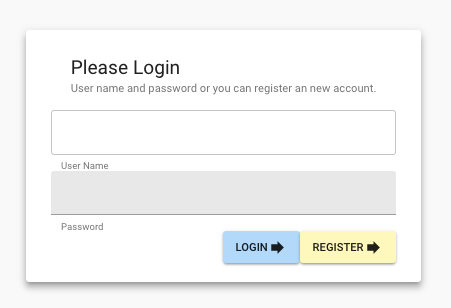
The cljs Parts
Include the following
(:require ["@material-ui/core"          :as mui]
          ["@material-ui/core/colors"   :as muicols]
          ["@material-ui/icons"         :as muicons]
          ["@material-ui/core/styles"   :refer [createMuiTheme withStyles]]
          ;[material-ui                  :as mui]
          ;[material-ui.icons            :as muicons]
          [reagent.core                 :as reagent]
          [goog.object                  :as gobj]))
Then
(defn login-page
  ([]
   [:<>
     [:> mui/CssBaseline]
     [:> mui/MuiThemeProvider {:theme custom-theme}
       [:> mui/Grid {:container    true
                     :direction    "column"
                     :item         true
                     :justify      "center"
                     :alignItems   "center"
                     :spacing      16
                     :style        {:minHeight "100vh"}}
          [:> mui/Card {:raised true}
               [:> mui/CardActions
                    [:> mui/CardContent
                      [:> mui/Grid {:container    true
                                    :direction    "column"
                                    :justify      "center"
                                    :spacing 16}
                         [:> mui/CardHeader {:title "Please Login"
                                             :subheader "User name and password or you can register an new account."}]
                         [:> mui/TextField {:helperText "User Name"
                                            :variant    "outlined"}]
                         [:> mui/TextField {:helperText "Password"
                                            :variant    "filled"}]
                         [:> mui/Grid {:container    true
                                       :direction    "row"
                                       :item         true
                                       :justify      "flex-end"
                                       :alignItems   "flex-end"
                                       :spacing      16}

                             [:> mui/Button
                                  {:variant "contained"
                                   :label   "Login"
                                   :color   "primary"}
                                  "Login"
                              [:> muicons/Forward]]
                             [:> mui/Button
                                   {:variant "contained"
                                    :label   "Register"
                                    :color   "secondary"}
                                   "Register"
                               [:> muicons/Forward]]]]]]]]]]))
It seems every bit as ugly as the react-material version below but at least after a massive struggle it works!!
Note that because this builds down to div elements we cannot use re-com box elements, the output just fails to compile or or run.
Also, the line
:style {:minHeight "100vh"}} Attempt Two - Using RE-COM, RE-FRAME And cljs-react-material-ui
See https://github.com/madvas/cljs-react-material-ui
The main problem is that the README on this project shows the project only supports material ui version 0.19.0. As of this date material design is at version v3.2.0. See https://material-ui.com/versions/
It can be seen from https://github.com/madvas/cljs-react-material-ui/blob/master/src/cljsreactmaterial_ui/core.cljs
that the library has support for flat-button and raised-button but the latest version of material-ui has additional button types, for example outline-button and text-button. The cljs-react-material-ui seems to have stagnated (over a year since the last fixes). Never the less it seemed worth trying it out.
This was another frustrating coding session!!
The project.clj
Include a dep on
[cljs-react-material-ui "0.2.48"] The Output Page
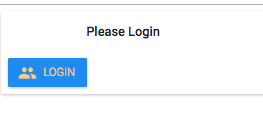
The cljs Parts
Include the following
[cljs-react-material-ui.core  :as ui]
[cljs-react-material-ui.icons :as ic] (defn login-page
([]
;[:div
[h-box
:align :center
:justify :center
:size "auto"
:children
[
(ui/mui-theme-provider
{:mui-theme (ui/get-mui-theme
{:palette {:type "light"}
:primary1-color (ui/color :orange-a100)
:raised-button
{:primary-text-color (ui/color :orange-a100)
:primary-color (ui/color :blue-500)
:font-weight 200
:align :center
:justify :center}})}
;(ui/paper
(ui/card
(ui/card-header "Please Login")
(ui/card-actions
(ui/raised-button
{:label "Login"
:icon (ic/social-group)
:primary true}))))]]))